Sibelius crashes on startup: how to fix it on Mac
Last updated 24 June 2026
Why Sibelius crashes when it opens
It is the plugin scan, not your score. At launch Sibelius loads its audio engine in the step it labels initializing playback system, and to do that it scans the audio plugins installed on your Mac. If one plugin is incompatible, corrupted, or slow to validate, the scan stalls and Sibelius hangs on the splash screen or quits outright. A large library makes it more likely, because there are more plugins that can fail. This affects every recent version, from Sibelius 7.5 to 2026, in both Ultimate and First.
Common culprits
The crash almost always traces back to the audio plugin scan, not to a notation or ManuScript plugin. The usual suspects:
- A heavy sample instrument that is slow to validate, such as a large Kontakt library.
- On Apple Silicon, a VST3 built only for Intel, or a stale copy that conflicts with the universal scan.
- The bundled playback engine left in a bad state after a Sibelius or plugin update.
- Out of date Playback Configurations carried over from an earlier version.
Sibelius 2026.2 and 2026.5 fixed several of the most frequent crash reports and added VST3 scanning, which helps, but the scan still runs at every launch, so a single bad plugin can still stop it.
Why Avid's own fix is risky
Avid documents this crash in two of its own support articles, and its standing answer is to rename your whole system plugin folder. It works, but it also hides those plugins from Logic, GarageBand and Pro Tools, so the rest of your studio loses them too. Users keep running into exactly that:
"AVID's solution is to rename my system plugin folder. This works but then Logic can't find the plugins."Apple Support Communities, March 2025
The better approach is to disable only what Sibelius trips on, keep your playback engine, and put everything back the moment you open your DAW.
Fix it by hand (slow)
You can disable plugins manually by moving them out of the folders Sibelius scans. This works, but it is tedious and easy to get wrong on a big library.
- Quit Sibelius.
- Open the plugin folders in Finder:
/Library/Audio/Plug-Ins/Components(AU),/Library/Audio/Plug-Ins/VSTand/Library/Audio/Plug-Ins/VST3. - Move recently installed or suspect plugins to a temporary folder on your Desktop.
- Open Sibelius. If it launches, add plugins back a few at a time until you find the one that breaks it.
- Leave the bad plugin out, or update it from the maker.
Fix it in one click (fast)
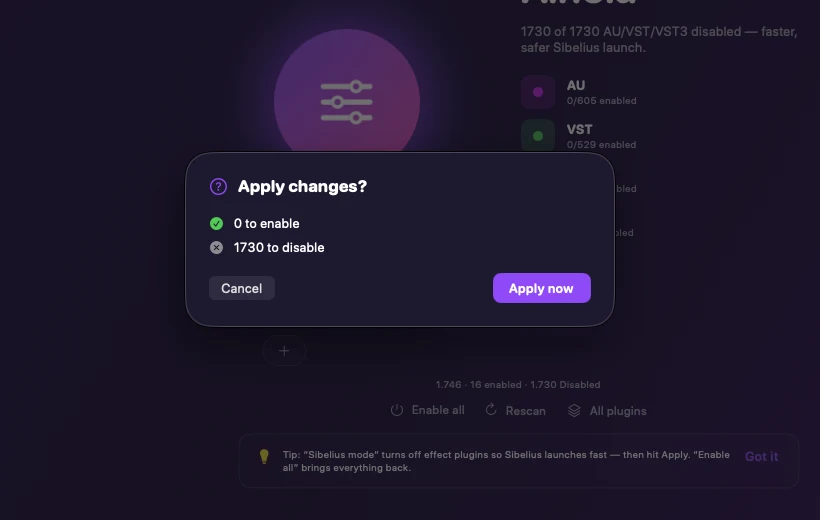
Ainola does the same thing without moving files around by hand, and without hiding plugins from the rest of your studio. Its Sibelius mode disables every AU, VST and VST3 except your playback engine, so Sibelius launches reliably, and re-enables your whole library the moment you switch back to your DAW. Nothing is ever deleted, every change is one click from undo.
- Download Ainola and open it.
- Click Sibelius mode.
- Review the staged changes and apply them with one password prompt.
- Open Sibelius. It starts fast.
Related questions
Why does Avid tell me to rename my plugins folder? +
It is the quickest way to take every plugin out of the scan, so Sibelius can launch. The downside is that Logic, GarageBand and Pro Tools lose those plugins too. Disabling only the formats Sibelius scans, and keeping your playback engine, avoids that.
Will I lose my plugins? +
No. Disabling only renames a file so hosts stop loading it. Re-enabling restores it exactly.
Does this work for any plugin format? +
Ainola handles AU, VST, VST3, CLAP and AAX. Sibelius mode focuses on the formats Sibelius scans and leaves AAX and CLAP untouched.
Which macOS versions are supported? +
macOS 12 Monterey or later, on Apple Silicon and Intel.
Sources
- Avid Knowledge Base, Sibelius crash: error initializing playback system (official troubleshooting).
- Avid, What's new in Sibelius May 2026 (Sibelius scans plugins at launch; 2026.5 adds VST3).
- Apple Support, where third-party Audio Units plug-ins are installed on Mac.
- The Sibelius Forum, hang on initializing playback system on startup (community reports).
More fixes: Sibelius will not open, stuck scanning plugins, slow to open, error initializing playback system, Sibelius 2026.5 slow to open.