Sibelius 2026.5 slow to open after the VST3 update
Last updated 24 June 2026
Why Sibelius 2026.5 is slower to open
It added a whole new folder to the scan. Released on 7 May 2026, Sibelius 2026.5 introduced VST3 plugin support. Until this version it scanned only Audio Units and VST2 at launch; now it inventories your VST3 plugins too.
VST3 plug-ins are scanned and cached the first time that they are loaded, so if you have a lot of VST3 plug-ins on your machine, your first launch of Sibelius 2026.5 may be slower than usual.Avid, What's new in Sibelius May 2026
VST3 is usually the biggest of the three. Steinberg ended VST2 licensing in 2018 and the audio world moved to VST3, so newer instruments and effects ship as VST3 and never as VST2. The moment 2026.5 starts reading that folder, a library that opened quickly before can suddenly take much longer, even though nothing is broken. For scorewriting you only need your playback engine, so most of that scan is time you can avoid.
First launch only, or every launch?
Tell the two cases apart before you change anything.
Only the first launch
Sibelius caches the scan, so the one-off inventory right after updating is expected. The next launches are quick. Nothing to fix.
Every launch, or it hangs
A heavy or faulty plugin is stalling the scan each time. Large Kontakt libraries and plugins that re-check their license on launch are the usual culprits. Trimming the scan fixes this.
Fix it by hand (slow)
You can disable plugins manually by moving them out of the folders Sibelius scans, including the VST3 folder that 2026.5 now reads. It works, but it is tedious and easy to get wrong on a big library.
- Quit Sibelius.
- Open the plugin folders in Finder:
/Library/Audio/Plug-Ins/VST3(the new one for 2026.5),/Library/Audio/Plug-Ins/Components(AU) and/Library/Audio/Plug-Ins/VST(VST2). - Move the plugins you do not need for playback to a temporary folder, and leave your playback engine in place.
- Open Sibelius. It scans fewer plugins, so it starts faster.
- Move plugins back when you need them in your DAW.
Fix it in one click (fast)
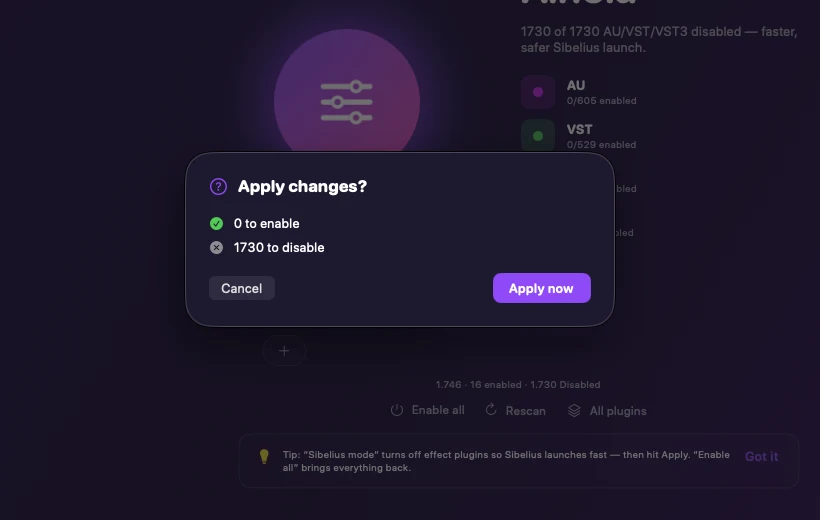
Ainola does the same thing without moving files around by hand. Its Sibelius mode disables every AU, VST and VST3 except your playback engine, so Sibelius 2026.5 launches quickly, and re-enables your whole library the moment you switch back to your DAW. Nothing is ever deleted, every change is one click from undo.
- Download Ainola and open it.
- Click Sibelius mode.
- Review the staged changes and apply them with one password prompt.
- Open Sibelius 2026.5. It scans far fewer plugins, so it starts much faster.
Related questions
Is the slow launch only the first time? +
On first load Sibelius 2026.5 scans and caches your VST3 plugins, so the first launch after updating is the slow one. If every launch stays slow, or Sibelius hangs, a heavy or faulty plugin is stalling the scan, and trimming the scan fixes that.
Why did Sibelius only get slow after the 2026.5 update? +
Earlier versions scanned only Audio Units and VST2 plugins. Sibelius 2026.5 added VST3 support, so it now also inventories your VST3 library, which for most people is the largest, the first time it loads.
Will I lose my VST3 plugins in my DAW? +
No. Disabling only renames the plugin file so Sibelius skips it. Re-enabling restores it exactly and your DAW sees it again.
Does Ainola handle VST3? +
Yes. Ainola manages AU, VST, VST3, CLAP and AAX. Sibelius mode turns off the AU, VST and VST3 plugins Sibelius does not need for playback and keeps your playback engine.
Sources
- Avid, What's new in Sibelius May 2026 (official release notes, VST3 scan and slower first launch).
- Scoring Notes, Sibelius 2026.5 adds VST3 support (scan and cache behaviour, VST2 licensing ended in 2018).
- Production Expert, Sibelius 2026.5 adds VST3 support and cloud part sharing.
- Apple Support, where third-party Audio Units plug-ins are installed on Mac.
- Steinberg, VST plug-in locations on macOS.
More fixes: Sibelius slow to open, stuck scanning plugins, crashing on startup, error initializing playback system.