
Ainola dashboard with the glowing mode control and the full plugin library enabled
Plugin management for macOS

Launch Sibelius in seconds, not minutes.

One bad plugin can hang Sibelius at launch. Ainola disables the troublemakers in one click and brings your whole library back the moment you switch to your DAW. Nothing is ever uninstalled.

Includes a fully featured 14-day trial. No card, no account. Universal, for Apple Silicon and Intel.

Featured on
Ainola on SaaSHub
Built by M Street Music studio Universal, Apple Silicon and Intel Secure checkout by Lemon Squeezy 14-day trial, no card

Ainola is a macOS app that enables or disables your audio plugins (AU, VST, VST3, CLAP and AAX) instantly, without uninstalling anything, so Sibelius and your DAW start fast and never choke on a bad plugin.

Every format you run One app for the whole library
AU
Audio Unit
.component
VST
Virtual Studio Technology
.vst
VST3
Steinberg VST 3
.vst3
CLAP
Clever Audio Plugin
.clap
AAX
Avid Pro Tools
.aaxplugin
Sibelius mode

One click. Everything off, except your playback engine.

Disable every AU, VST and VST3 except the engine Sibelius needs, so it launches reliably. AAX and CLAP stay untouched. Re-enable your whole library the moment you switch back to your DAW.

What's inside

A complete view of every plugin you own.

Your setups, one tap away

Save Mixing, Live or Mastering presets from the current state or a tag, and switch your whole rig instantly.

Order from thousands

Tag plugins one at a time or in bulk. Search and sort by name, vendor, format or status.

Find the doubles

Spot the same plugin installed in more than one place and reclaim the space.

It only ever renames

Disabling renames the file with a standard, reversible suffix. Nothing is ever deleted, and every change is one click from undo.

Ten languages, native speed

A modern, native macOS app with an in-app language switcher.

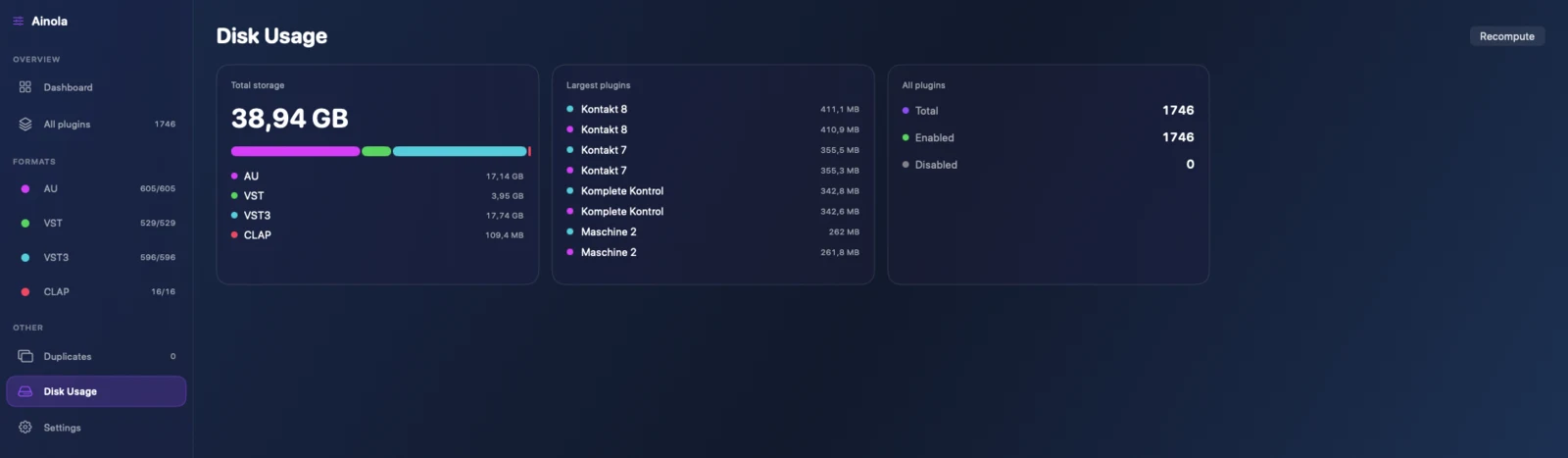
Disk usage

See what fills the drive.

Total storage, a breakdown by format, and your largest plugins at a glance. Spot duplicates and reclaim the space.

Ainola disk usage breakdown by plugin format
How it works

From download to done.

Download

Free, no account

Open the disk image and drag Ainola into Applications.

Try

Fourteen days

Start the trial with one click. No card, no sign-up.

Buy

Paste your key

Buy a license and activate the app you already have. No re-download.

Pricing

One app. Priced by the Macs you run it on.

Every license is the complete app, nothing held back: Sibelius mode, the full library view, presets, duplicate finder, disk usage and ten languages, with free updates within v1. One bad plugin can cost you an afternoon. Ainola is a one-time price, not a subscription.

Starter
€39
Pay once. One Mac.
  • The complete app, every feature
  • One device activation
  • Free updates within v1
  • License key by email
Buy Starter
Pro
€79
Pay once. Up to three Macs.
  • The complete app, every feature
  • Three device activations
  • Free updates within v1
  • License key by email
Buy Pro
Teams
€199
Pay once. Up to ten Macs.
  • The complete app, every feature
  • Ten device activations
  • Invoicing on request
  • Priority email support
Buy Teams

Start with a free 14-day trial. Download, no card needed.

Secure checkout by Lemon Squeezy, the merchant of record. Pay in your local currency, with VAT and invoicing handled. Refund policy.

Questions
Does Ainola delete my plugins? +

No. It only renames a plugin file so hosts stop loading it, and re-enabling restores it exactly. Nothing is ever uninstalled.

Will it affect my DAW? +

Disabled plugins will not appear in any host. Run enable all, or your DAW mode, to bring them back instantly.

Why not the Mac App Store? +

Ainola needs to modify plugin files in your Library folders, which the App Store sandbox forbids. It ships as a direct download instead.

What happens if I get a refund? +

Access follows your license. If an order is refunded, the license is deactivated and Ainola locks on its next online check.

Which formats and macOS versions? +

AU, VST, VST3, CLAP and AAX, on macOS 12 Monterey or later. The build is universal, for Apple Silicon and Intel.

Sibelius keeps crashing at launch? See the fixes.

Kristijan Sinković in the M Street Music studio
Who makes Ainola

Built by a studio that hit the wall first.

Ainola comes from M Street Music, a recording, mixing and mastering studio. We ran into the Sibelius launch crash on our own Mac, with thousands of plugins installed, and got tired of renaming folders and losing the whole DAW setup every time just to open a score.

So we built the tool we wanted: one click to a clean Sibelius launch, one click back to a full studio, and nothing ever uninstalled. If it saves you the afternoon it used to cost us, it has done its job.

Kristijan Sinković, M Street Music

The name

Where your score comes home.

Ainola is the lakeside house in Finland where Jean Sibelius lived and worked, named for his wife, Aino. A place built to come home to.

We took the name for the same reason. When a bad plugin locks you out of your session, Ainola is where your whole setup comes back, in one click.

Ainola

Launch Sibelius in seconds, not minutes.

14-day free trial, no account, macOS 12+, universal for Apple Silicon and Intel

Download free trial